
As an Amazon Associate I earn from qualifying purchases.
If you need a Screen For Livescope setup, you first need to decide whether you want a complete Garmin display or protection for equipment you already own. The products here cover both jobs, but they are not interchangeable.
Display size, mapping, touchscreen control, wireless networking, and LiveScope support matter most for a new chartplotter. For existing equipment, look at precise fit, glare control, scratch resistance, and protection during storage.
These five picks were selected from the supplied products for distinct uses: large-screen viewing, mapping-ready chartplotters, a smaller display, a glass protector, and a dedicated LVS32 cover.
This guide explains what separates each option, where its features help on the water, and which limitations you should consider before choosing.
Our Top 5 Screen For Livescope Picks at a Glance
| Product | ||
|---|---|---|
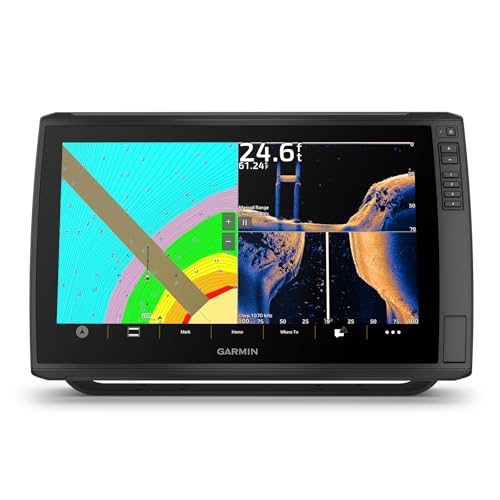 |
Garmin ECHOMAP Ultra 2 16-Inch Chartplotter Largest live-sonar viewing |
Check Price |
 |
Garmin ECHOMAP Ultra 2 126sv Chartplotter 12-inch mapped chartplotter |
Check Price |
 |
Garmin ECHOMAP Ultra 2 10-Inch Fishfinder Compact chartplotter setup |
Check Price |
 |
INNOSURE HD Glass Protector for ECHOMAP Ultra 2 Scratch-resistant display protection |
Check Price |
 |
HYMCMZA Garmin LiveScope LVS32 Cover LVS32 storage protection |
Check Price |
Top 5 Picks: Detailed Reviews
1. Garmin ECHOMAP Ultra 2 16-Inch Chartplotter
The Screen For Livescope here is Garmin’s ECHOMAP Ultra 2 with a large 16-inch Full HD IPS touchscreen and keyed assist. The bigger display gives you more room to view LiveScope returns, mapping, and sonar detail, while vivid scanning-sonar color palettes help separate fish from structure. Preloaded Garmin Navionics+ charts cover coastal and inland lakes, with Auto Guidance+ for planning. Built-in support covers LiveScope, CHIRP traditional sonar, UHD ClearVü, and SideVü products, while 10 Hz multi-band GPS improves position accuracy.
What We Like:
- The 16-inch screen provides the largest live-sonar viewing area in this selection.
- Full HD IPS resolution and vivid color palettes should make sonar detail easier to interpret.
- Preloaded Garmin Navionics+ mapping covers coastal and inland lake use.
- Built-in support works with the full range of Garmin LiveScope products.
- Wired and wireless networking can share sonar, waypoints, and routes with compatible ECHOMAP units.
What Could Be Improved:
- Its 16-inch display needs more installation space than the smaller chartplotters in this range.
- LiveScope and other sonar hardware are sold separately, so this unit alone does not provide those sonar views.
- Auto Guidance+ is intended for planning only and does not replace safe navigation practices.
Buy this if you want the largest available display here for monitoring LiveScope, charts, and multiple sonar views, especially on a boat with room for a larger installation. Skip it if your console is compact or you need a complete sonar setup rather than a chartplotter that supports separately sold transducers.
2. Garmin ECHOMAP Ultra 2 126sv Chartplotter
This 12-inch Screen For Livescope combines Garmin Navionics+ mapping with LiveScope support in a chartplotter suited to anglers who want a larger, organized view. The display gives you room to follow maps and sonar without crowding the interface, while wireless networking lets you share sonar, waypoints, and routes with compatible devices. Screen recording helps you save and share notable catches. Multi-band GPS is designed to improve position accuracy. The main limitation is that the GT56UHD-TM transducer is not included and must be purchased separately.
What We Like:
- The 12-inch display provides a spacious view for maps and live sonar.
- Garmin Navionics+ mapping supports chart-focused navigation.
- Wireless networking lets you share sonar, waypoints, and routes.
- Screen recording makes it easy to save fish catches for sharing.
- Multi-band GPS is designed for improved position accuracy.
What Could Be Improved:
- The GT56UHD-TM transducer is sold separately, adding another purchase before you can use compatible sonar functions.
- Its larger 12-inch format may be less suitable when you need a compact chartplotter setup.
- You may not benefit fully from the networking features if you do not use compatible devices.
Buy this if you want a 12-inch Garmin chartplotter that combines mapping, wireless sharing, recording, and LiveScope support in one unit. Skip it if you need a ready-to-use package with a transducer included, or if your boat favors a smaller display and simpler setup.
3. Garmin ECHOMAP Ultra 2 10-Inch Fishfinder
The Garmin ECHOMAP Ultra 2 Fishfinders is a compact Screen For Livescope setup with a 10-inch sunlight-readable IPS touchscreen. Built-in Garmin Navionics+ U.S. Inland and Coastal mapping helps you navigate and read depth shading, while the one-year subscription provides daily map updates. Its 10 Hz multi-band GPS improves position accuracy and heading data. You can wirelessly share sonar, waypoints, and routes with compatible ECHOMAP Ultra 2 or UHD2 units. It supports LiveScope and UHD scanning sonars, but the transducer is sold separately.
What We Like:
- The sunlight-readable IPS touchscreen is suited to bright conditions.
- Built-in mapping and depth range shading support more informed navigation.
- The 10 Hz multi-band GPS provides accurate position and heading data.
- Wireless sharing makes it easier to exchange sonar data, waypoints, and routes.
- You can wirelessly control compatible Force Trolling Motors.
What Could Be Improved:
- The 10-inch display offers less viewing space than the larger Ultra 2 models.
- You need to purchase a compatible LiveScope or UHD scanning transducer separately.
- The mapping subscription lasts one year, so continued updates require attention after that period.
Buy it if you want a smaller Garmin chartplotter with a clear touchscreen, built-in mapping, accurate GPS, and wireless networking for compatible units. It suits anglers who value a compact setup and LiveScope support. Skip it if you need the largest possible sonar view or want a complete system with the transducer included.
4. INNOSURE HD Glass Protector for ECHOMAP Ultra 2
As a Screen For Livescope accessory, the INNOSURE HD Glass Protector adds a protective layer to compatible 12-inch Garmin ECHOMAP Ultra and Ultra 2 displays. Its precision-cut 9H tempered glass helps resist scratches, scuffs, impacts, hooks, rods, tackle, and bumps in rough water. The ultra-clear finish preserves screen brightness, sharpness, colour, and detail while keeping touchscreen access accurate. An oleophobic coating reduces fingerprints and oil, so a quick wipe can restore a clean view. It fits Garmin ECHOMAP Ultra 122sv, 125sv, 126sv and Ultra 2 equivalents.
What We Like:
- The 9H tempered glass helps defend the display against everyday scratches and cockpit impacts.
- The HD-clear finish preserves brightness, sharpness, and touchscreen visibility.
- The precision-cut shape is made for compatible 12-inch ECHOMAP Ultra displays.
- The oleophobic coating helps reduce fingerprints and makes cleaning easier.
- It adds useful protection around hooks, rods, tackle, and rough-water bumps.
What Could Be Improved:
- Compatibility is limited to the listed 12-inch Garmin ECHOMAP Ultra and Ultra 2 models.
- The package contains one screen protector, so a replacement is not included.
- It protects the display surface, not the rest of the chartplotter or fishfinder.
Buy it if you own a compatible 12-inch Garmin ECHOMAP Ultra or Ultra 2 and want to guard the screen against scratches, smudges, and cockpit knocks without sacrificing clarity or touch access. Skip it if your unit has a different screen size or model, since this protector is precisely cut for the listed displays.
5. HYMCMZA Garmin LiveScope LVS32 Cover
The HYMCMZA Fish Finder Cover is a Screen For Livescope storage accessory designed for Garmin LiveScope LVS32 units from 2019 to present. Its durable Oxford fabric and reinforced stitching suit outdoor boat storage, while the water-resistant surface helps shield equipment from light rain, water, dust, and changing marine conditions. An adjustable bottom drawstring lets you tighten the cover around the unit, helping it stay in place. The spacious design fits fishing boats, bass boats, kayaks, pontoons, and other marine setups.
What We Like:
- Oxford fabric is suited to outdoor storage.
- Reinforced stitching supports regular handling.
- The water-resistant surface helps against light rain and water.
- The adjustable drawstring provides a closer, more secure fit.
- It is compatible with Garmin LiveScope LVS32 models from 2019 to present.
What Could Be Improved:
- It is intended for stored equipment, not protection while you are actively using the sonar.
- Water-resistant fabric is not the same as fully waterproof protection.
- The cover is designed for the LVS32, so it may not suit other LiveScope hardware.
Buy it if you store a Garmin LiveScope LVS32 on a boat, kayak, or other marine setup and want basic protection from light weather, dust, and handling. Skip it if you need a cover for active use, full waterproofing, or equipment outside the stated LVS32 compatibility.
How To Choose A Screen For Live Sonar
The right Screen For Livescope depends first on how much live sonar information you want to view at once. You should then weigh display size against the space available on your boat, decide whether you need chartplotter functions, and account for protection and storage. Accessories can preserve equipment, but they cannot replace a viewing display.
Choose a display size you can use comfortably
A larger screen makes it easier to keep live sonar imagery visible alongside other information, while a smaller display suits tighter consoles and more compact setups. Measure the available mounting area before choosing, and consider where you will sit while viewing the screen. A display that fits poorly can be less useful than a smaller one positioned well.
Screen For Livescope: match the unit to your setup
Check whether you want a chartplotter, a fishfinder, or a unit that combines both roles for your boat. Chartplotter models are suited to setups where mapped navigation information matters, while a fishfinder-focused choice may better fit a compact arrangement. Also confirm that the display works with the LiveScope equipment you plan to use.
Separate viewing needs from protection
A screen protector and a sonar-system cover solve different problems from a display. A glass protector is intended to help guard the display surface from scratches, while a cover for the LVS32 is intended for storage protection. Neither accessory adds screen area or replaces the chartplotter or fishfinder itself.
Think about installation and everyday handling
Before buying, consider how you will mount, view, clean, and store each item. A larger display may offer a more spacious viewing area but require more console room. Protection accessories make more sense when their fit matches the specific display or sonar component, so check the product compatibility before ordering.
Screen For Livescope FAQs
What screen size is best for LiveScope?
The best size depends on your available mounting space and how much information you want visible at once. A larger display generally gives you more room for live sonar viewing, while a smaller unit can suit a compact console or limited installation area.
Do I need a chartplotter or a fishfinder for LiveScope?
Choose a chartplotter if mapped navigation information is important to your setup. Choose a fishfinder if you want a more compact fish-finding arrangement. Before buying, confirm that the selected unit is compatible with the LiveScope equipment you intend to use.
Can a glass screen protector improve LiveScope images?
No. A glass protector is for scratch-resistant display protection, not for increasing screen size or improving sonar imagery. It can help protect the display surface, but you still need a compatible chartplotter or fishfinder to view LiveScope.
What does an LVS32 cover protect?
An LVS32 cover is intended to provide storage protection for the LVS32 component. It is not a viewing display, chartplotter, or screen protector. Choose it when your priority is protecting that sonar equipment during storage rather than adding display protection.
Should I buy an accessory instead of a LiveScope display?
No, not if you still need to view live sonar. A display provides the viewing function, while a glass protector helps guard the screen and an LVS32 cover protects the sonar component during storage. Accessories support the setup but do not replace its display.
Which Livescope Display Or Protection Pick Fits You?
The Garmin ECHOMAP Ultra 2 16-Inch Chartplotter is the best overall pick if your priority is the largest live-sonar viewing area. Its main alternative is the Garmin ECHOMAP Ultra 2 126sv Chartplotter, which offers a 12-inch mapped chartplotter format for setups where a somewhat smaller display suits your space. Choose the 10-inch model for a compact arrangement, or add the protection accessories when guarding the display or LVS32 matters most.